










.jpeg "Sprunki")











.jpeg "Geometry Dash Lite 3D")




.png "Idle Sheep Fight")
.png "Geometry Jump")




.jpeg "Hole IO")


.png "Corn Tycoon")

.jpeg "Slope Run")

.jpeg "Knife Hit")






.jpeg "Monkey Mart")



.png "Alone on Island")

.png "Block Blast")




.png "Kiwi Clicker")


.png "Apple Worm")







.png "Candy Crush")



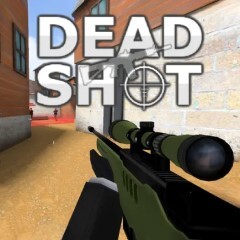
Dead Shot
About the Game
DEADSHOT.io is a multiplayer first-person shooter that throws you into fast, skill-based matches where reflexes and precision decide every outcome.
Play directly in your web browser, grab your friends, and jump into the arena - no downloads required.
This browser FPS offers high-energy combat across a range of maps and modes. You can face off against global players or team up with friends in custom matches. Every round moves quickly, demanding sharp aim and quick thinking to survive. Logging in unlocks additional weapons, skins, and ranking tiers for long-term progression.
How to Play
DEADSHOT.io takes inspiration from classic competitive shooters such as CS:GO but streamlines the setup for instant online play. Click Play to enter a live match immediately, or create a custom room to select your preferred map and mode. Invite friends, adjust sensitivity, or tweak control settings to match your play style.
- Move: Use W, A, S, D keys to navigate.
- Aim: Right-click to use your scope.
- Shoot: Left-click to fire.
- Slide: Hold Shift to glide across the floor and outmaneuver enemies.
Game Modes
Several multiplayer modes keep the experience varied and competitive:
- FFA (Free for All): Every player fights independently.
- TDM (Team Deathmatch): Two teams compete for the highest total score.
- Hardpoint: Teams control a designated area to earn points over time.
- KC (Kill Confirmed): Collect dog tags from defeated players to score.
- Domination: Capture and defend multiple points on the map to win.
Weapons and Customization
Choose from four main weapon types - SMG, Assault Rifle, Sniper, and Shotgun. Each weapon suits a different style of play, from close combat to long-range accuracy. You can unlock new skins and items using coins earned from victories or daily and weekly missions. Registered players also gain access to ranked tiers including Silver, Gold, Platinum, Diamond, and Champion.
Graphics and Interface
The game features minimalist but clear 3D visuals designed for speed and responsiveness. The maps are optimized for smooth frame rates, while weapon animations and shooting effects maintain visual clarity. The lack of intrusive ads and clean UI make DEADSHOT.io suitable for quick sessions at work or longer play on mobile devices.
Tips for Beginners
- Keep your aim steady and go for headshots - accuracy matters more than volume of fire.
- Use sliding to dodge shots and surprise enemies around corners.
- Learn the layouts of popular maps to gain positional advantage.
- Stick with your team in objective modes to secure points efficiently.
Comparison with Grow a Garden
While DEADSHOT.io focuses on fast-paced competition and quick reactions, Grow a Garden takes the opposite approach. In Grow a Garden, players nurture plants, manage resources, and watch slow progress over time - a calm, incremental style of gameplay. DEADSHOT.io demands reflexes and precision in short bursts, whereas Grow a Garden rewards patience and planning. Both share the advantage of being browser-based games that load instantly, but they cater to entirely different moods: one adrenaline-driven, the other relaxing and methodical.
Conclusion
DEADSHOT.io delivers a sharp, accessible FPS experience that fits perfectly in your browser. With fast matchmaking, multiple game modes, and deep weapon customization, it's an ideal choice for players who want quick, competitive action anytime and anywhere.